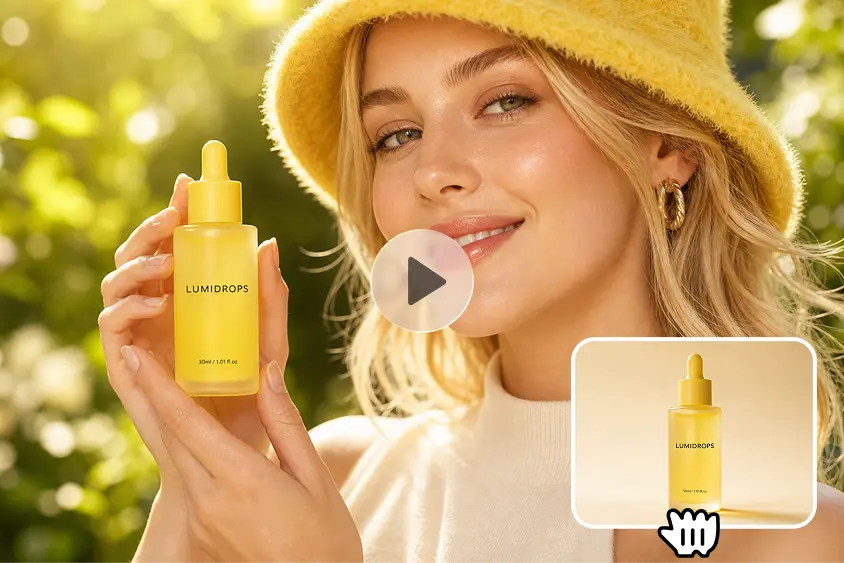
Food photography conveys color, texture, freshness, style of preparation, and presentation before the customer even tastes the food. AI video creation allows restaurants to transform their current photos into captivating promotional clips. Dreamina AI leverages Seedance’s video generation capabilities to bring image references to life, incorporating camera movements and atmospheric effects. Gentle zooms, subtle steam-like motion, and carefully controlled lighting can make food visuals more captivating. But effects created should never deceive the customer regarding the ingredients, quantities, preparation, or the actual quality of the product.
Identify the Food Details That Benefit Most From Animation
There are various kinds of animation that can be applied to different dishes and show their most attractive visible qualities. If you’re shooting hot dishes, use light steam effects and slow moves. Close-ups, reflections on glass, and condensation are all good for cold drinks. Frosting, pastry layers, chocolate decorations, and color tops should all be given due consideration in the dessert area. Natural colors and delineation of ingredients really stand out in fresh salads. Directional lighting is great for grilled foods, as it enhances char lines and shiny surfaces. Bakery products beg for close-ups of flaky layers, crisp crusts, and delicate crumbs. With the help of AI video generator from image techniques, these details can be animated without having to shoot a whole new live-action video. But these effects are still creative interpretations, not physical simulations. It might seem reasonable that generated steam, liquid movement, or melting would be happening, but not necessarily so, and it would not be a true representation of how food actually cooks.
Choose an Animation Style That Fits the Dish and Campaign
Dreamina AI can help you with creative video ideas that are appropriate for various restaurant marketing campaigns and branding styles. Cinematic hero shots are shots that have slow camera movements and lighting that highlights signature dishes without overpowering viewers. Close-ups emphasize texture, such as sauces, crusts, herbs, and frosting, but close-ups can reveal visual flaws. Atmospheric restaurant visuals involve the fusion of food, appropriate backdrops, inviting lighting, and the depth of the environment. Ingredient-led animations highlight familiar ingredients and complementary colors while maintaining recipe accuracy. Promotional loops are short introductions of seasonal specials and featured menu items. Select the intensity of the movement, composition, and tone of the campaign based on the desired platform and source photo.
Write Food Animation Prompts That Emphasize Realistic Visual Detail
Good prompts include determining the dish, defining the direction of movement, and defining the clear visual boundaries. Talk about what you see in the ingredients, presentation, camera angle, lighting, background, and the mood that is desired. Ask for overhead, three-quarter, table-level, or macro framing as appropriate for the subject. Specify soft side lighting, warm highlights, natural daylight, or an appropriate restaurant atmosphere. Request consistent geometry of the plates, consistent placement of ingredients, and limited movement of plates. For instance, the “ramen” prompt might specify a slow push-in effect, a subtle “steam” movement, a glossy broth, distinct topping elements, warm directional lighting, and a steady ceramic bowl. Explain what is seen and do not say that the AI reproduces the genuineness of heat, taste, or cooking conditions.
Steps to Make Food Photos Sizzle Using Image to Video for Restaurants
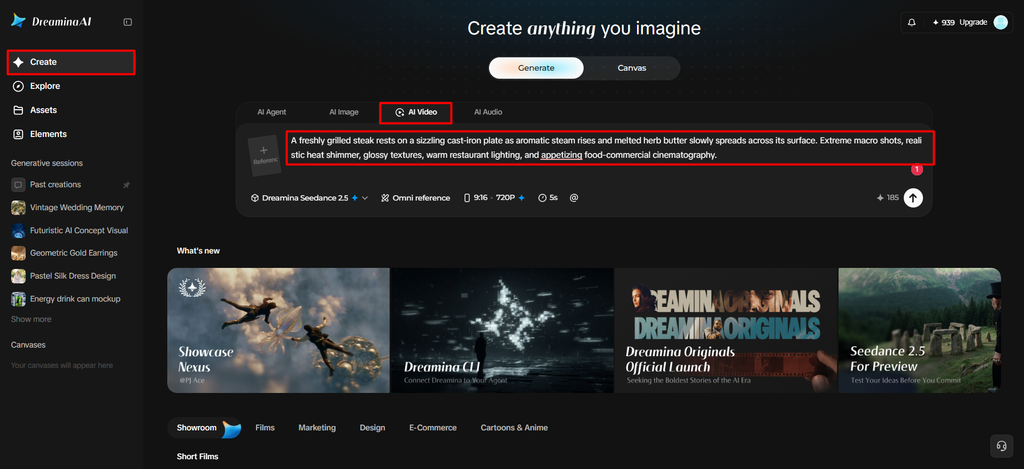
Step 1: Upload your dish photo and describe the sizzle
- Sign up or log in to Dreamina, then turn your dish photos into sizzling clips.
- Click the “Create” tab from the left menu and select the “AI video” option next.
- Upload your best food photo, then type a detailed text prompt for the dish video. Describe video elements, theme, and concept, such as rising steam, bubbling sauce, and glistening oil.
Step 2: Pick a model and cook up the video
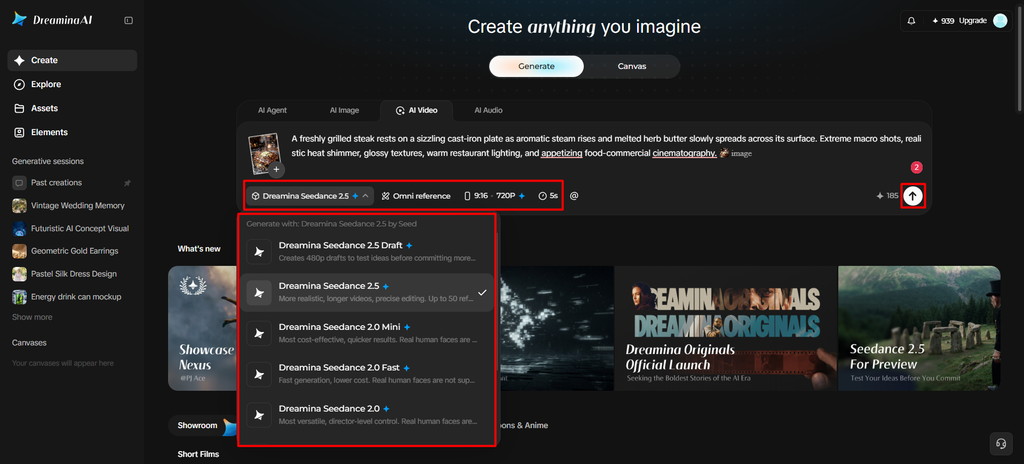
- First, choose a model from the options present at the bottom of the dialogue box.
- You can try Dreamina Seedance 2.5, Dreamina Seedance 2.0, Dreamina Seedance 2.0 Fast, and others. Dreamina Seedance 2.0 Mini and Dreamina Seedance 1.0 also suit quick menu clips and promos.
- Click on “Omni reference” to guide the AI with multiple reference images of the dish. That gives you accurate video results with true-to-life colors and appetizing textures on every plate.
- Now select the custom aspect ratio and resolution from the “Aspect ratio” and “Resolution” tabs.
- Finally, click on the “Generate” tab to begin creating your sizzling food video right now.
Step 3: Refine the sizzle and download
- If the steam looks fake, you can “Edit prompt” or “Regenerate” to refine the results.
- You can also edit the generated video using the “Edit video” option to fix lighting.
- Moreover, you can “Edit segment” to edit only part of the video, like the pour.
- Use “Extend video” to lengthen the clip so the sizzle lasts through the whole scene. Then improve your video quality using “Creative upscale” for crisp textures and juicy, vivid detail.
- Dreamina gives you complete freedom to edit your food video the way you like best.
- Finally, click on the “Download” tab present at the top right of the full interface. This saves the video file on your local device for menus and social media posts.
Food-Specific Animation Concepts to Explore With Dreamina AI
- Steam and Warmth: Ask for a hint of steamy activity over a soup or hot entrée. Maintain stability of plate, toppings, and surfaces.
- Sauce and Glaze: Bring attention to the shine of sauces or glazed surfaces with close-ups. Do not use excessive liquid motion which alters the presentation.
- Beverage Refreshment: Emphasize condensation, glass reflections, and subtle camera movement around cold beverages. Ensure that there are no discrepancies in the glass, liquid level, and garnish.
- Dessert Detail: Use controlled close-ups to highlight frosting, layered pastry, chocolate decorations, or fruit toppings. Check textures for flicker and texture changes.
- Clean Light/Moderate Movement: Promote fresh ingredients by using clean lighting with minimal movement. Maintain the original recipe and style of the restaurant.
- Signature Dish Reveal: Start with a broad shot and work your way in to the signature dish. Keep food in view at all times during a clip.
These concepts can be adapted to various restaurant types, and the quality of source images and the capabilities of the model will affect the outcomes.
Prepare Animated Food Visuals for Restaurant Marketing Channels
Use different clips for different marketing locations and perceptions. Vertical framing works well for Reels or Shorts campaigns, and landscape framing can be used for restaurant websites. Clear food presentation and movement without distracting from menu information are good assets for digital menu displays. Paid ads need to be congruent with the offering and not contain deceptive promotion. Online ordering visuals are especially important as customers are expecting the meals they order online to be the same as what they see in the visuals. Seasonal campaigns can be used to keep the lighting and motion the same and change the dishes. Check the size, time limits, and export requirements of each platform before posting.
Preserve Food Accuracy and Review the Finished Video
Check all clips produced before using them for restaurant marketing. Review the accuracy of ingredients, consistency of portions, size of plates, and the setup of visible food. Be on the lookout for excessive steam, liquid movement that looks unnatural, flickering textures, and/or distracting movement of objects. Don’t assume that effects generated mean that ingredients or preparation methods are superior if there’s no evidence. Check the rights of using source photographs, music, and other creative materials. While Dreamina AI can streamline the creation of promotional videos, it is crucial to involve human oversight for accurate representation.
Conclusion
Dreamina AI enables restaurants to convert the current food photos into captivating promotional videos without having to schedule a complete food shoot. Generation, prompt refinement, and editing tools enable flexible creative workflows with seedance-powered generation. Controlled movement, accurate food representation, appropriate formatting, and effective quality checks are required to achieve effective results. Animated food content can boost restaurant marketing on digital platforms when visual creativity is used in conjunction with the actual dish.
Leave a Reply